Understanding Issue Details
Last updated: June 23, 2026
Every issue the Aisle analyzer surfaces across SAST, SCA, Infrastructure as a Code (IaC), licenses and secrets detection opens into an issue details view. This is where you'll spend most of your time in the platform: reviewing what AISLE found, understanding why it matters, and deciding what to do next.
This guide walks through what you'll see, how to work with it, and how to get the most out of the page.
What an issue represents
Each finding has its own unique ID and lifecycle. That means you can always trace a single vulnerability from the moment the analyzer surfaced it to the moment it's resolved - including who reviewed it, how it was scored, and why it ended where it did.
What you'll find on the issue detail page
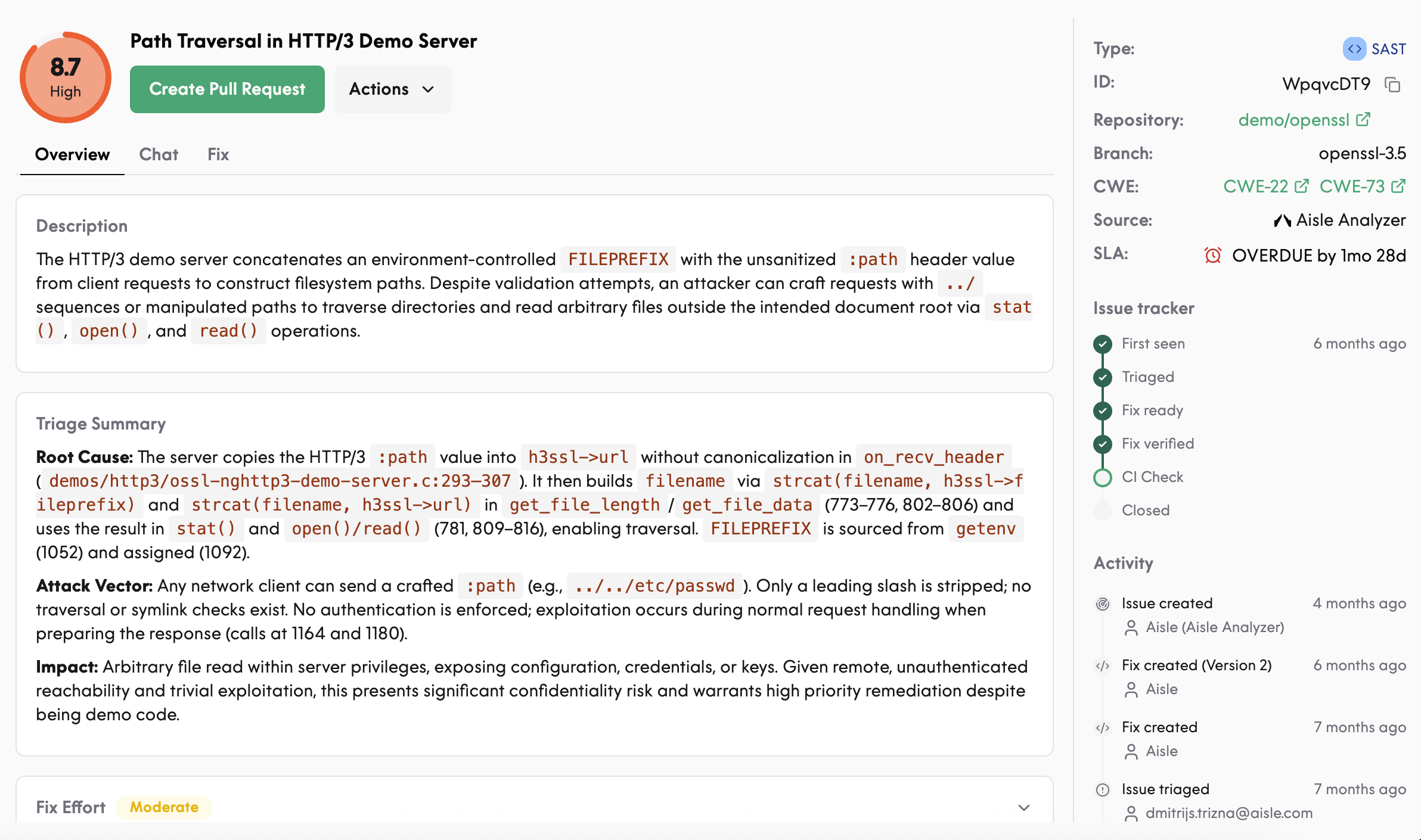
Overview
The top of the page gives you the essentials:
Description - what the vulnerability is, in plain language
Triage summary - the evidence our analyzer used to decide this is a real issue worth your attention
Risk factors - the specific inputs feeding the severity score
Fix effort - a rough estimate of the work involved
CWE classification - the standard weakness identifier
SLA status - where this finding sits against your defined service levels
Scoring
Aisle's severity score goes beyond CVSS. The score is built from:
Exposure scope - is this reachable from the public internet?
Data flow risk - what kind of data moves through the vulnerable path?
Reachability - is the vulnerable code actually called in your application?
Exploit complexity - how hard is this to weaponise?
For SCA findings, the score also incorporates CVSS and threat intelligence signals.
Fix effort is shown for context but does not influence severity.
Data flow
For SAST findings, the data flow section shows the path tainted data takes through your code from source to sink. This is the fastest way to understand whether a finding is genuinely exploitable in your environment.
Threat intelligence (SCA)
Dependency-related findings include:
Exploit maturity (mature exploit vs. proof of concept)
EPSS score
Whether the CVE is being actively exploited in the wild
Cross-references to public threat intel sources
Working with an issue
Chat with the analyzer
Every issue includes an embedded chat agent. You can:
Ask questions about the vulnerability
Provide context about your architecture or compensating controls and have the issue retriaged
Request a revised fix candidate if the first one doesn't fit your codebase
Leave feedback that helps Aisle learn your environment
The more context you provide — through chat, through repository configuration files, or through manual triage decisions — the more accurate future analysis becomes.
Actions you can take
Dismiss or mark as false positive
Mark as resolved manually
Request a retriage
Generate a pull request with the fix candidate
Add comments for your team